
WCS_Earplugs
612F512CD4CB21D5About WCS_Earplugs
Toggle game SFX volume with a keybind, switching between full and a set reduced level.
Full Description
Toggle game SFX volume with a keybind, switching between full and a set reduced level.
View on WorkshopAdd to Server Config
Copy this JSON snippet and add it to the "mods" array in your server's config.json file:
{
  "modId": "612F512CD4CB21D5",
  "name": "WCS_Earplugs",
  "version": "6.0.2"
}
Need help? Check our Mod Installation Guide or use the Config Generator.
Related Mods

True First Person
Enhance your gaming experience with the First Person Motion mod for Arma Reforger. This mod brings a realistic touch to your gameplay by showing every movement your character makes.
Remington 870
This mod introduces a new shotgun to Arma Reforger that can fire two types of ammo: slug and rubber slug.


WCS_AFKKick
Automatically warns and kicks inactive players to free up slots, with configurable timers and player count limits. Admins are exempt.
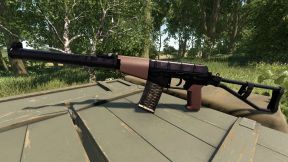
WCS_AvtomatSpetsialnyVal
The AS VAL (Avtomat Specialniy VAL - "Special Automatic rifle VAL") is a silenced automatic rifle with an integral suppressor designed for special forces units.
Frequently Asked Questions
How do I install WCS_Earplugs on my server?
To install WCS_Earplugs, add its mod ID (612F512CD4CB21D5) to the "mods" array in your server's config.json file. The server will automatically download the mod from the Workshop when it starts.
Can I use WCS_Earplugs on PS5 or Xbox?
Console compatibility depends on the mod. Check the Workshop page for WCS_Earplugsto see if it's marked as console-compatible. Some mods with custom scripts may only work on PC.
Does WCS_Earplugs require other mods?
Check the mod's description above for any mentioned dependencies. Use our Mod Browser to search for and add any required dependencies to your config.