RadioBackpackSettingsSave
65CD63937BB1CF8FAbout RadioBackpackSettingsSave
Takes Radio Backpacks off of the default blacklist for saving.
Add to Server Config
Copy this JSON snippet and add it to the "mods" array in your server's config.json file:
{
  "modId": "65CD63937BB1CF8F",
  "name": "RadioBackpackSettingsSave",
  "version": "1.0.0"
}
Need help? Check our Mod Installation Guide or use the Config Generator.
Related Mods
CombatOpsArlandAllGear
Added in US Arsenal boxes to all four spawn points.
ConflictPVEIncreaseSpawns
More counter attack spawns
PVEConflictRemixedVanilla2.0 S
Testing to attempt to fix the 200 supply limit that many Conflict PVE scenarios seem to have.

AttachmentsCompatibility
Now compatible with 0.9.8 version of the game. Will be deprecated as soon as all the mods switch to using vanilla classes. Does NOT contain playable content. Allows weapons to share attachments.
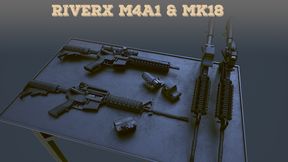
M4 & MK18 with attachments
Colt M4A1 & MK-18 rifles with attachments pack

Project Redline - Core
Project Redline: Core Contains shared scripts, weapons, and assets common to many other mods.
Frequently Asked Questions
How do I install RadioBackpackSettingsSave on my server?
To install RadioBackpackSettingsSave, add its mod ID (65CD63937BB1CF8F) to the "mods" array in your server's config.json file. The server will automatically download the mod from the Workshop when it starts.
Can I use RadioBackpackSettingsSave on PS5 or Xbox?
Console compatibility depends on the mod. Check the Workshop page for RadioBackpackSettingsSaveto see if it's marked as console-compatible. Some mods with custom scripts may only work on PC.
Does RadioBackpackSettingsSave require other mods?
Check the mod's description above for any mentioned dependencies. Use our Mod Browser to search for and add any required dependencies to your config.