Disable Radio Requirement
64FAC6B8C439ADD5About Disable Radio Requirement
Custom settings for my server
Add to Server Config
Copy this JSON snippet and add it to the "mods" array in your server's config.json file:
{
  "modId": "64FAC6B8C439ADD5",
  "name": "Disable Radio Requirement",
  "version": "1.0.0"
}
Need help? Check our Mod Installation Guide or use the Config Generator.
Related Mods

Vietnam War Radio
Vietnam War Radio (Update 1.0.2) -Added new track "Rising Storm 2 - Vietnam Menu Theme" Changed radio volume, should now be a bit louder with some increase in audio distance
Disable Building Destruction
Disables destruction to buildings but still allows destruction to trees, bushes, fences, etc.
FIA Switch to ION
Switches FIA faction to ION from RHS
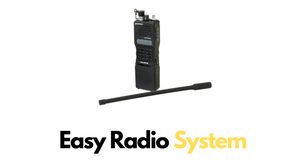
Easy Radio System
TEST script sacados de REALISM OVERHAUL-RADIOS de Maisteri Desactivado el menu Radial Radios por defecto salen apagadas Ampliado el radio de radios cortas a 5km
USASOC - Assaulter Radio
This mod introduces the PRC-168 radio system with built-in MESH networking capability, giving players seamless, reliable communications in the field.
Frequently Asked Questions
How do I install Disable Radio Requirement on my server?
To install Disable Radio Requirement, add its mod ID (64FAC6B8C439ADD5) to the "mods" array in your server's config.json file. The server will automatically download the mod from the Workshop when it starts.
Can I use Disable Radio Requirement on PS5 or Xbox?
Console compatibility depends on the mod. Check the Workshop page for Disable Radio Requirementto see if it's marked as console-compatible. Some mods with custom scripts may only work on PC.
Does Disable Radio Requirement require other mods?
Check the mod's description above for any mentioned dependencies. Use our Mod Browser to search for and add any required dependencies to your config.